How to find any order in our app or how to import any old / missing order to our app
Type the order name in the top right search field in the order listing page of our app then you can see that order.
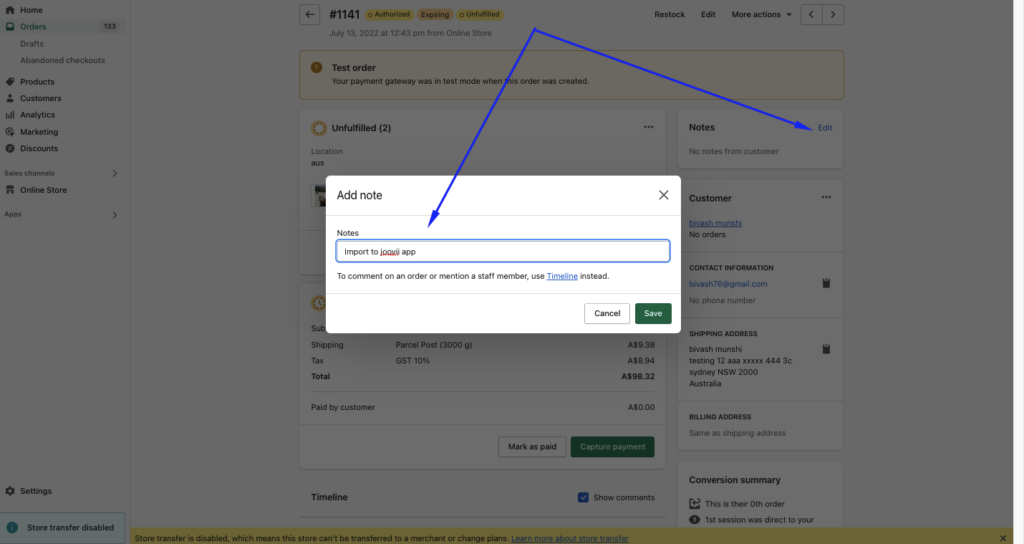
To import any old or missing order to our app you have to just edit the order in shopify or simply add some order note then you can find that order in our app. Then you can see or find that order in our app.
Important Announcement: Sendle Services
Sendle has announced that they will halt all new parcel pickup and delivery bookings effective January 11, 2026. Consequently, no bookings will be accepted through the API or dashboard, and the direct Shopify Shipping integration is expected to be removed. Joovii has a range of app integrations for other carriers and are ready to help you continue shipping.
For merchants who prefer pickups, we recommend switching to carriers such as Aramex, Couriers Please or Team Global Express. If you would like introductions to account representatives at any of these carriers, we would be happy to facilitate that connection. Our Multi Carrier App, which supports shipping with Aramex, Couriers Please, Auspost (My Post Business and eParcel), DHL, and Team Global Express, will be a valuable tool during this transition. You can access the app here: Multi Carrier App.
For merchants currently using our Sendle App with other carriers enabled, you can continue to book shipments with those carriers.
If you would like to discuss your options over a call, our team can outline the benefits of each carrier in a meeting. Please schedule a time using the link here: Book a Meeting